/
/
Best AI Tools for Video & Image Editing: Meta AI, Muse Spark, Runway, Adobe Firefly & More
Best AI Tools for Video & Image Editing: Meta AI, Muse Spark, Runway, Adobe Firefly & More
5 min
read
Best AI Tools for Video & Image Editing: Meta AI, Muse Spark, Runway, Adobe Firefly & More
Best AI Tools for Video & Image Editing: Meta AI, Muse Spark, Runway, Adobe Firefly & More
Ai
Content

Author

Scroll down
to read more!
Summerize with ChatGPT
Summerize with Gemini
Summerize with Claude
Best AI Tools for Video & Image Editing: Meta AI, Muse Spark, Runway, Adobe Firefly & More
Best AI Tools for Video & Image Editing: Meta AI, Muse Spark, Runway, Adobe Firefly & More
If you're producing content for a brand right now, you've probably noticed the tools you used a year ago already feel a step behind. The best AI tools for video and image editing have moved past filters and templates into full creative partners: they generate footage from a prompt, hold a character's face steady across ten scenes, and clean up a bad photo in seconds. Meta, Runway, and Adobe are leading that shift, and each one is pulling in a different direction. Here's what each tool actually does well, where it still falls short, and how a studio like Motion Labs decides which one earns a spot in a real production workflow.
If you're producing content for a brand right now, you've probably noticed the tools you used a year ago already feel a step behind. The best AI tools for video and image editing have moved past filters and templates into full creative partners: they generate footage from a prompt, hold a character's face steady across ten scenes, and clean up a bad photo in seconds. Meta, Runway, and Adobe are leading that shift, and each one is pulling in a different direction. Here's what each tool actually does well, where it still falls short, and how a studio like Motion Labs decides which one earns a spot in a real production workflow.
Not every AI tool that generates a flashy demo clip holds up in production. Before we get into the specific platforms, it helps to know what actually separates a usable tool from a novelty one. The strongest options share a few traits: they keep characters and objects consistent across multiple shots, they support high-resolution export (4K is quickly becoming the baseline), and they give editors real creative control instead of a single "generate and hope" button. Cost and turnaround time matter too, since most of these tools are built for teams working against a deadline, not solo experimentation.
What Can Meta AI's Muse Image and Muse Video Do for Creators?
Meta's answer to this space is Muse Image and Muse Video, the first media generation models built in-house by Meta Superintelligence Labs. Muse Image handles prompt-based editing with a level of precision that lets you compose a scene from multiple reference images at once, and it can even pull visual references directly from a public Instagram account by tagging it in the prompt. That social integration is what makes it feel different from a standard generator: it's built to work inside Meta's own apps rather than as a standalone studio tool. How to use muse Spark Ai Model
On human-preference leaderboards, Muse Image currently ranks second only to OpenAI's image model across text-to-image and editing tasks, which is a strong showing for a first-generation product. Muse Video is still rolling out, with early signals pointing to solid prompt adherence and consistency across frames. Both models ship with Content Seal, an invisible watermark that flags AI-generated images, which is worth knowing if your brand has disclosure requirements for sponsored or synthetic content.
What Is Muse Spark and How Does It Power Meta's AI Tools?
A tool that comes up a lot alongside Muse Image is Muse Spark, which is a different piece of the same puzzle. Where Muse Image is focused on generating and editing pictures, Muse Spark 1.1 is Meta's broader multimodal model, handling coding, video captioning, reasoning, and agentic tool use. It's the model quietly powering Meta AI's assistant, and it integrates directly with Muse Image so the two can plan and execute tasks together instead of working as separate tools. Meta Muse Spark AI Tool: Complete Guide, Features, Benefits & How to Use (2026)
For content teams, the practical value of Muse Spark is in the workflow it enables: ultra-descriptive video captioning, visual-to-code generation, and agentic execution across image, video, audio, and 3D assets in one workspace. It's currently in public preview and available via API for developers who want to build on top of it, with Meta signaling aggressively competitive pricing against other multimodal models on the market.
Not every AI tool that generates a flashy demo clip holds up in production. Before we get into the specific platforms, it helps to know what actually separates a usable tool from a novelty one. The strongest options share a few traits: they keep characters and objects consistent across multiple shots, they support high-resolution export (4K is quickly becoming the baseline), and they give editors real creative control instead of a single "generate and hope" button. Cost and turnaround time matter too, since most of these tools are built for teams working against a deadline, not solo experimentation.
What Can Meta AI's Muse Image and Muse Video Do for Creators?
Meta's answer to this space is Muse Image and Muse Video, the first media generation models built in-house by Meta Superintelligence Labs. Muse Image handles prompt-based editing with a level of precision that lets you compose a scene from multiple reference images at once, and it can even pull visual references directly from a public Instagram account by tagging it in the prompt. That social integration is what makes it feel different from a standard generator: it's built to work inside Meta's own apps rather than as a standalone studio tool. How to use muse Spark Ai Model
On human-preference leaderboards, Muse Image currently ranks second only to OpenAI's image model across text-to-image and editing tasks, which is a strong showing for a first-generation product. Muse Video is still rolling out, with early signals pointing to solid prompt adherence and consistency across frames. Both models ship with Content Seal, an invisible watermark that flags AI-generated images, which is worth knowing if your brand has disclosure requirements for sponsored or synthetic content.
What Is Muse Spark and How Does It Power Meta's AI Tools?
A tool that comes up a lot alongside Muse Image is Muse Spark, which is a different piece of the same puzzle. Where Muse Image is focused on generating and editing pictures, Muse Spark 1.1 is Meta's broader multimodal model, handling coding, video captioning, reasoning, and agentic tool use. It's the model quietly powering Meta AI's assistant, and it integrates directly with Muse Image so the two can plan and execute tasks together instead of working as separate tools. Meta Muse Spark AI Tool: Complete Guide, Features, Benefits & How to Use (2026)
For content teams, the practical value of Muse Spark is in the workflow it enables: ultra-descriptive video captioning, visual-to-code generation, and agentic execution across image, video, audio, and 3D assets in one workspace. It's currently in public preview and available via API for developers who want to build on top of it, with Meta signaling aggressively competitive pricing against other multimodal models on the market.
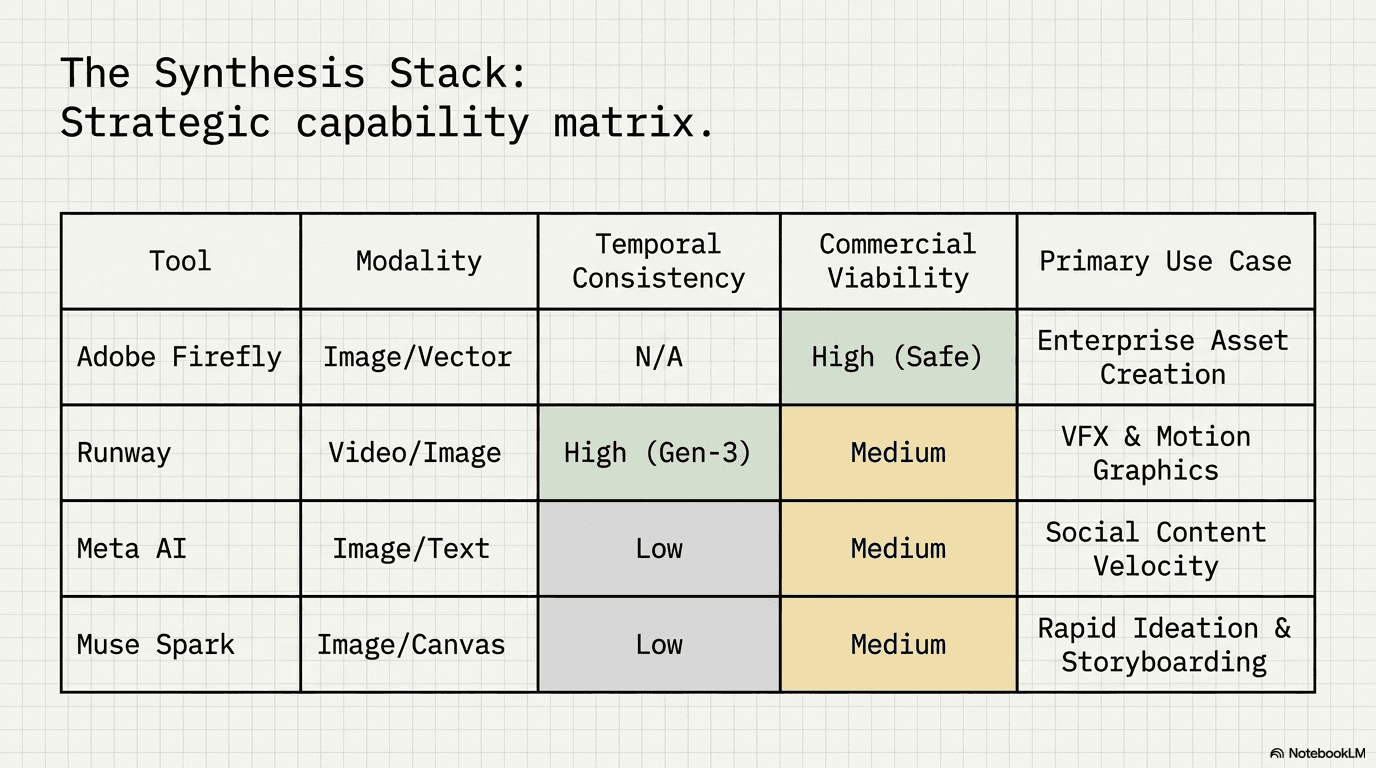
Runway Gen-4 remains the tool most creative professionals reach for when they need cinematic quality, not just a fun clip. It supports up to 60 seconds of continuous generation with real temporal consistency in 4K, and its Motion Brush 3.0 feature lets you literally paint where and how something in a frame should move, with separate controls for speed and direction.
What sets Runway apart is world and character consistency: you can lock in a look and Runway will hold that character, location, and mood across multiple scenes instead of drifting shot to shot, which used to be the biggest complaint about AI video. The Aleph in-video editor, Act-Two motion capture (which turns an uploaded performance video into full character animation without mocap gear), and custom Workflows pipelines make it a genuine production tool rather than a generator you paste into an edit later. The tradeoff is a learning curve; Runway rewards people who are willing to treat it like a real piece of creative software. Muse Spark Ai model Tools for Run Meta ads
What's New in Adobe Firefly's AI Video and Image Tools?
Adobe Firefly's latest video and image update leans into being the hub rather than a single model. Firefly now gives you access to more than 30 outside models, including Google's Veo and Nano Banana, Runway's own Gen-4.5, and Adobe's own Firefly Image Model 5, all inside one interface. That's a meaningful shift: instead of picking one AI video tool, Firefly lets you pick the best model for each specific shot.
On the editing side, Firefly's newer image tools add AI Markup, where you can brush, erase, or box specific areas of an image and guide the edit with targeted prompts instead of one generic instruction. Custom models are now in public beta too, so brands can train Firefly on their own product photography to keep a consistent style. On video, the Quick Cut tool automates first-pass edits, and the standalone Firefly Video Editor now handles color grading, HDR, and audio cleanup (noise, reverb, speech balancing) well enough for broadcast-level work, all with full 4K support.
What Other AI Editing Tools Are Worth Trying?
Meta, Runway, and Adobe cover most of the video and image generation landscape, but a few other tools are worth having in the kit depending on the job:
Canva AI — the fastest option for teams that need on-brand social graphics and quick image edits without a steep learning curve.
HeyGen — built for AI avatar videos, useful for localized or personalized video at scale without booking a camera crew.
None of these replace Meta, Runway, or Adobe for heavier production work, but they fill in the gaps for faster, lighter-weight content needs.
How Do You Choose the Right AI Editing Tool for Your Brand?
The honest answer is that most serious content teams end up using more than one. Muse Image is strong for social-native, Instagram-linked content; Runway is the pick when a brand needs cinematic, character-consistent video; and Firefly makes sense for teams already living inside Adobe's ecosystem who want model choice without switching software. The tool matters less than having a team that knows which one to reach for on a given brief, and how to keep the output on-brand and disclosure-compliant.
Where Motion Labs fits in This is exactly the gap Motion Labs' video production and content team works in every day: pairing the right AI tool with real creative direction, so the output looks like your brand and not like a generic AI demo. If your team is trying to figure out which of these tools actually belongs in your workflow, that's a conversation worth having before you commit budget to any single platform. |
Runway Gen-4 remains the tool most creative professionals reach for when they need cinematic quality, not just a fun clip. It supports up to 60 seconds of continuous generation with real temporal consistency in 4K, and its Motion Brush 3.0 feature lets you literally paint where and how something in a frame should move, with separate controls for speed and direction.
What sets Runway apart is world and character consistency: you can lock in a look and Runway will hold that character, location, and mood across multiple scenes instead of drifting shot to shot, which used to be the biggest complaint about AI video. The Aleph in-video editor, Act-Two motion capture (which turns an uploaded performance video into full character animation without mocap gear), and custom Workflows pipelines make it a genuine production tool rather than a generator you paste into an edit later. The tradeoff is a learning curve; Runway rewards people who are willing to treat it like a real piece of creative software. Muse Spark Ai model Tools for Run Meta ads
What's New in Adobe Firefly's AI Video and Image Tools?
Adobe Firefly's latest video and image update leans into being the hub rather than a single model. Firefly now gives you access to more than 30 outside models, including Google's Veo and Nano Banana, Runway's own Gen-4.5, and Adobe's own Firefly Image Model 5, all inside one interface. That's a meaningful shift: instead of picking one AI video tool, Firefly lets you pick the best model for each specific shot.
On the editing side, Firefly's newer image tools add AI Markup, where you can brush, erase, or box specific areas of an image and guide the edit with targeted prompts instead of one generic instruction. Custom models are now in public beta too, so brands can train Firefly on their own product photography to keep a consistent style. On video, the Quick Cut tool automates first-pass edits, and the standalone Firefly Video Editor now handles color grading, HDR, and audio cleanup (noise, reverb, speech balancing) well enough for broadcast-level work, all with full 4K support.
What Other AI Editing Tools Are Worth Trying?
Meta, Runway, and Adobe cover most of the video and image generation landscape, but a few other tools are worth having in the kit depending on the job:
Canva AI — the fastest option for teams that need on-brand social graphics and quick image edits without a steep learning curve.
HeyGen — built for AI avatar videos, useful for localized or personalized video at scale without booking a camera crew.
None of these replace Meta, Runway, or Adobe for heavier production work, but they fill in the gaps for faster, lighter-weight content needs.
How Do You Choose the Right AI Editing Tool for Your Brand?
The honest answer is that most serious content teams end up using more than one. Muse Image is strong for social-native, Instagram-linked content; Runway is the pick when a brand needs cinematic, character-consistent video; and Firefly makes sense for teams already living inside Adobe's ecosystem who want model choice without switching software. The tool matters less than having a team that knows which one to reach for on a given brief, and how to keep the output on-brand and disclosure-compliant.
Where Motion Labs fits in This is exactly the gap Motion Labs' video production and content team works in every day: pairing the right AI tool with real creative direction, so the output looks like your brand and not like a generic AI demo. If your team is trying to figure out which of these tools actually belongs in your workflow, that's a conversation worth having before you commit budget to any single platform. |

Which AI tool is best for video editing right now?
Runway Gen-4 is the strongest choice for cinematic, character-consistent video, while Adobe Firefly is better if your team wants access to multiple AI video models (including Runway's) inside one editing suite.
Is Meta's Muse Image free to use?
Yes, Muse Image is free for consumers through the Meta AI app, WhatsApp, and Instagram Stories, with paid subscription tiers available for creators who need higher generation volume or extra features.
What's the difference between Muse Image and Muse Spark?
Muse Image is Meta's image generation and editing model. Muse Spark is the broader multimodal model behind Meta AI that handles reasoning, captioning, and agentic tasks, and it integrates with Muse Image to power more complex, multi-step creative requests.
Can these AI tools replace a video production team?
They speed up production significantly, but they still need creative direction, brand consistency checks, and editorial judgment, which is where a production team adds the most value.
The Bottom Line
AI video and image tools have moved from novelty to genuine production infrastructure in a very short window. Meta's Muse Image and Muse Spark, Runway Gen-4, and Adobe Firefly each solve a different part of the content problem, and picking the right one (or the right combination) depends on what you're actually trying to make. If you'd rather skip the trial-and-error and get content that's already dialed in for your brand, get in touch with Motion Labs and we'll help you build an AI-powered content workflow that actually fits your team.
Which AI tool is best for video editing right now?
Runway Gen-4 is the strongest choice for cinematic, character-consistent video, while Adobe Firefly is better if your team wants access to multiple AI video models (including Runway's) inside one editing suite.
Is Meta's Muse Image free to use?
Yes, Muse Image is free for consumers through the Meta AI app, WhatsApp, and Instagram Stories, with paid subscription tiers available for creators who need higher generation volume or extra features.
What's the difference between Muse Image and Muse Spark?
Muse Image is Meta's image generation and editing model. Muse Spark is the broader multimodal model behind Meta AI that handles reasoning, captioning, and agentic tasks, and it integrates with Muse Image to power more complex, multi-step creative requests.
Can these AI tools replace a video production team?
They speed up production significantly, but they still need creative direction, brand consistency checks, and editorial judgment, which is where a production team adds the most value.
The Bottom Line
AI video and image tools have moved from novelty to genuine production infrastructure in a very short window. Meta's Muse Image and Muse Spark, Runway Gen-4, and Adobe Firefly each solve a different part of the content problem, and picking the right one (or the right combination) depends on what you're actually trying to make. If you'd rather skip the trial-and-error and get content that's already dialed in for your brand, get in touch with Motion Labs and we'll help you build an AI-powered content workflow that actually fits your team.
the call your competitor wish you would'nt take


Related Posts





Related Posts
Related Posts
Motion labs
info@motionlabs.agency


+971 55317 1706
C-1802, ONTARIO TOWER, PLOT NO. 49-0, BUSINESS BAY, DUBAI, 00000
click to meet me :)
click to meet me :)
© All Rights Reserved | 2026


Motion labs
info@motionlabs.agency
+971 55317 1706
C-1802, ONTARIO TOWER, PLOT NO. 49-0, BUSINESS BAY, DUBAI, 00000
Private policy
Terms & Conditions
© All Rights Reserved | 2026
click to meet me :)