/
/
The Ultimate WordPress and Framer SEO/GEO Checklist
The Ultimate WordPress and Framer SEO/GEO Checklist
5 min
read
The Ultimate WordPress and Framer SEO/GEO Checklist
The Ultimate WordPress and Framer SEO/GEO Checklist
SEO
Marketing

Author

Scroll down
to read more!
Summerize with ChatGPT
Summerize with Gemini
Summerize with Claude
The Ultimate WordPress and Framer SEO/GEO Checklist
The Ultimate WordPress and Framer SEO/GEO Checklist
Turn your website into a high-ranking, AI-discoverable asset, one step at a time.
Two platforms, one checklist: technical SEO and generative engine optimization working together.
Search is running two systems at once right now. Google still crawls, indexes, and ranks your pages the old way. But a growing share of searchers never see that list of blue links at all. They see a summary, written by AI, that either quotes your site or ignores it completely.
That second system is what people call GEO or AIO, generative engine optimization and AI optimization. It runs on the same foundation as SEO, but it rewards different things: clear structure, direct answers, and content a language model can lift out of your page without guessing. Whether your site runs on WordPress or Framer, this checklist walks through both, section by section, so nothing gets missed.
Why your website needs an SEO and GEO checklist right now
The numbers explain the urgency better than any opinion could. When an AI Overview shows up on a Google search, only about 8% of users still click a traditional result, compared with 15% when there's no AI summary above the fold, according to Pew Research Center. That's roughly a 47% drop in the odds someone clicks through to your site.
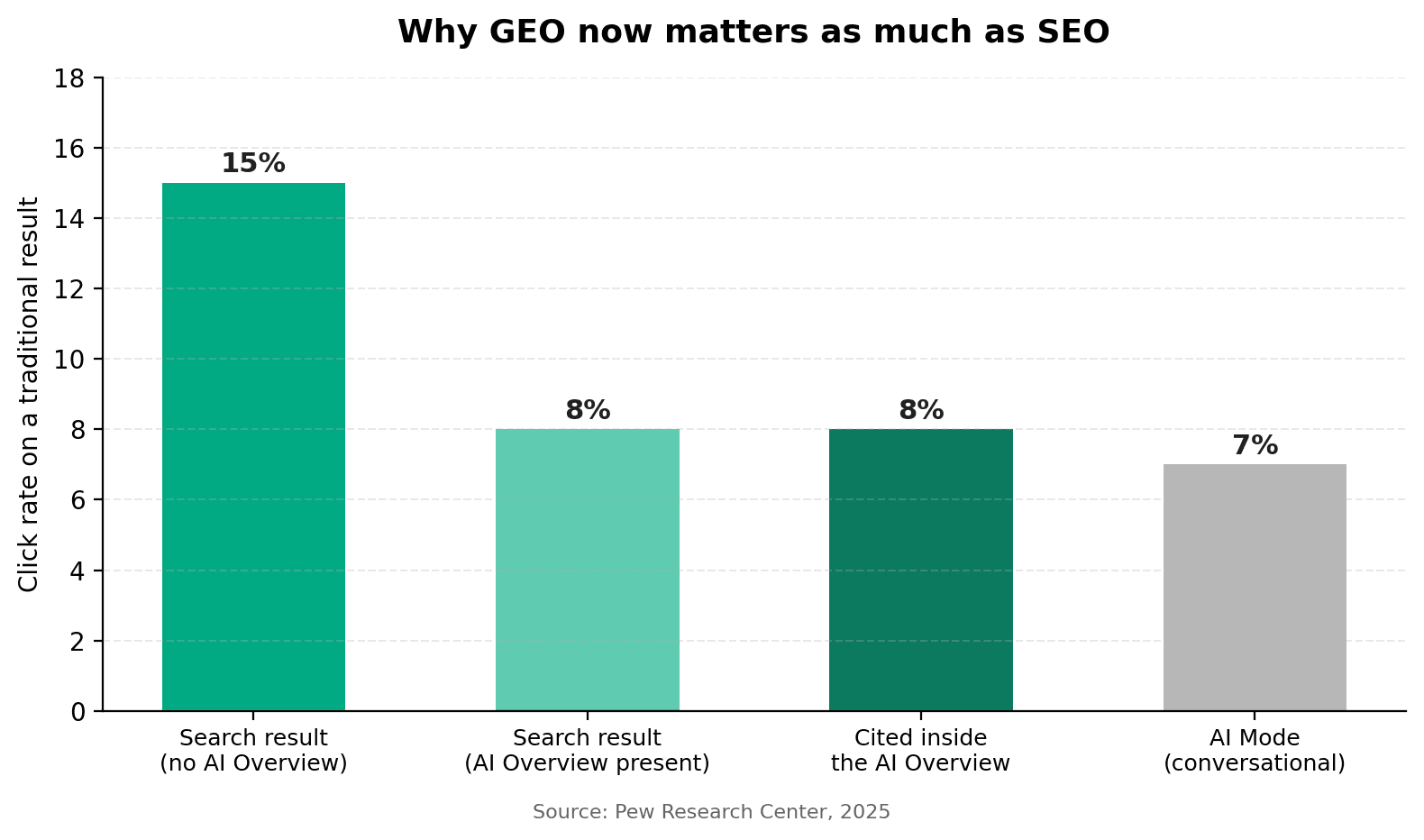
Click share by search result type. Getting cited inside the AI answer is now part of the ranking game.
This isn't a reason to abandon SEO. It's a reason to run SEO and GEO side by side. Pages that are still technically sound and easy to crawl are also the pages AI systems find easiest to cite. The checklist below covers both at once.
Turn your website into a high-ranking, AI-discoverable asset, one step at a time.
Two platforms, one checklist: technical SEO and generative engine optimization working together.
Search is running two systems at once right now. Google still crawls, indexes, and ranks your pages the old way. But a growing share of searchers never see that list of blue links at all. They see a summary, written by AI, that either quotes your site or ignores it completely.
That second system is what people call GEO or AIO, generative engine optimization and AI optimization. It runs on the same foundation as SEO, but it rewards different things: clear structure, direct answers, and content a language model can lift out of your page without guessing. Whether your site runs on WordPress or Framer, this checklist walks through both, section by section, so nothing gets missed.
Why your website needs an SEO and GEO checklist right now
The numbers explain the urgency better than any opinion could. When an AI Overview shows up on a Google search, only about 8% of users still click a traditional result, compared with 15% when there's no AI summary above the fold, according to Pew Research Center. That's roughly a 47% drop in the odds someone clicks through to your site.
Click share by search result type. Getting cited inside the AI answer is now part of the ranking game.
This isn't a reason to abandon SEO. It's a reason to run SEO and GEO side by side. Pages that are still technically sound and easy to crawl are also the pages AI systems find easiest to cite. The checklist below covers both at once.
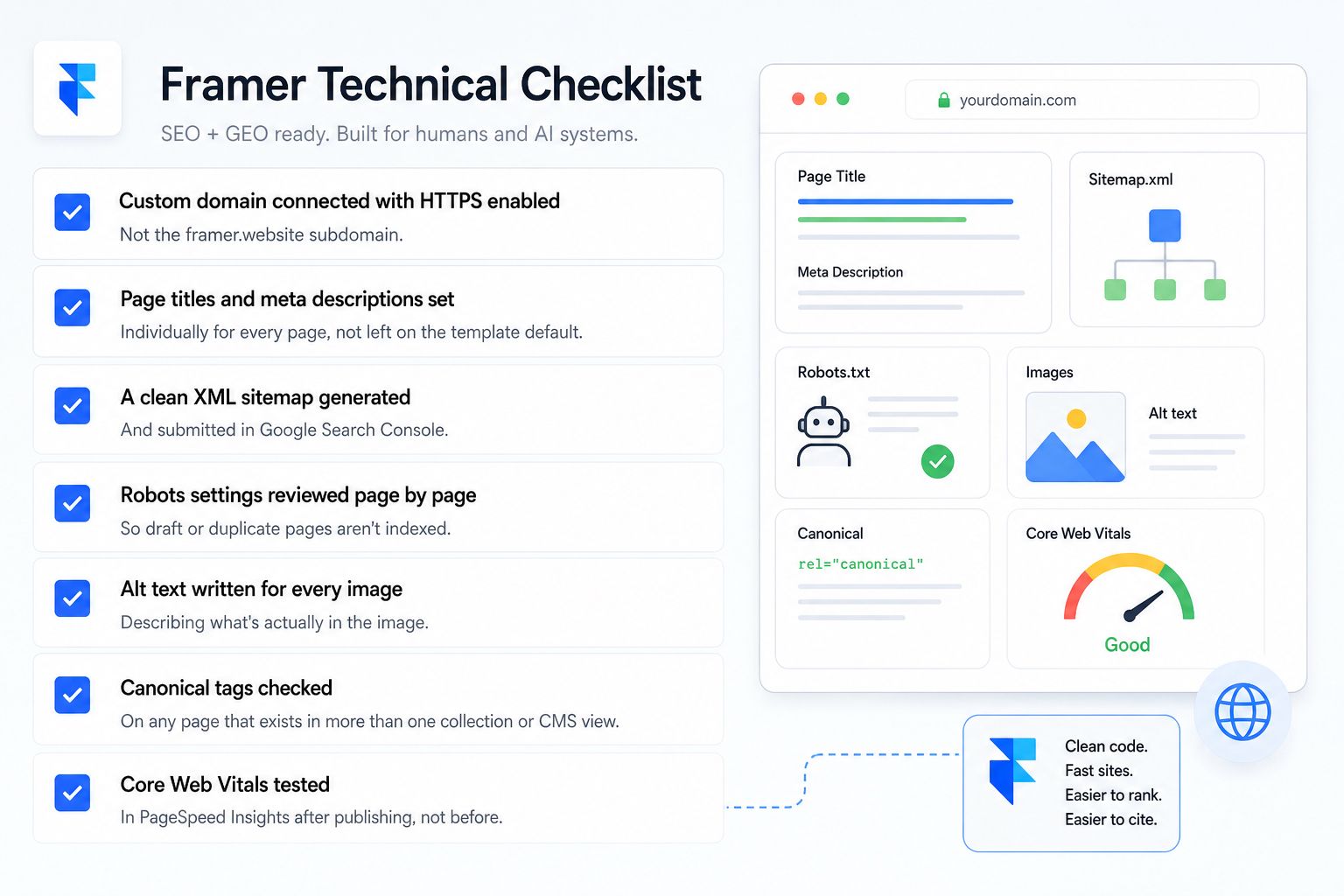
Framer publishes clean code by default, which gives you a head start. These are the settings and details worth confirming on every project.
Framer technical checklist ☑ Custom domain connected with HTTPS enabled, not the framer.website subdomain ☑ Page titles and meta descriptions set individually for every page, not left on the template default ☑ A clean XML sitemap generated and submitted in Google Search Console ☑ Robots settings reviewed page by page so draft or duplicate pages aren't indexed ☑ Alt text written for every image, describing what's actually in the image ☑ Canonical tags checked on any page that exists in more than one collection or CMS view ☑ Core Web Vitals tested in PageSpeed Insights after publishing, not before |
WordPress SEO and GEO checklist: technical foundation
WordPress gives you more control, which also means more places for something to be misconfigured. Work through these before touching content.
WordPress technical checklist ☑ An SEO plugin (Yoast, Rank Math, or similar) installed and configured, not just activated ☑ Permalink structure set to include the page or post name, not default query strings ☑ Image compression and a caching plugin active to protect Core Web Vitals ☑ robots.txt reviewed so it isn't blocking CSS or JS files search engines need to render the page ☑ SSL certificate installed and all internal links updated to HTTPS ☑ Broken link check run at least quarterly, since plugin updates and theme changes create orphaned URLs ☑ Schema markup plugin configured for articles, products, or local business data as relevant |
On-page SEO checklist that still matters in 2026
None of the fundamentals disappeared. AI systems and search crawlers both still rely on the basic signals below to understand what a page is about.
☑ One H1 per page, matching what the page actually delivers
☑ H2s and H3s written as natural search queries a person would type or ask
☑ Primary keyword in the title, the first 100 words, and at least one subheading
☑ Internal links pointing to related, genuinely relevant pages on your own site
☑ A meta description under 160 characters that reads like a reason to click, not a keyword list
☑ Image file names that describe the image, not IMG_4021.jpg
GEO and AIO checklist: how to get cited by AI search
Getting cited by ChatGPT, Perplexity, Google AI Overviews, or Claude runs on a different logic than ranking number one. These systems extract short, self-contained answers, so the page has to hand them one.
GEO and AIO checklist ☑ Answer the core question in the first 2 to 3 sentences of the section, before any setup or backstory ☑ Use exact numbers, dates, and named sources instead of vague claims ☑ Break long explanations into short, scannable sections with one idea each ☑ Add FAQ content that mirrors how people actually phrase questions to an AI assistant ☑ Publish an llms.txt file at your root domain if your platform supports it ☑ Keep author and business information visible and consistent across every page (E-E-A-T signals) ☑ Update older articles with current data instead of letting them go stale |
This is also where the two internal reads below are useful next steps. Our guide on
Claude Cowork local SEO prompts walks through prompt workflows for local content, and our SEO vs Google Ads breakdown helps you decide where to put budget once the technical work is done.
Framer vs WordPress: which one makes SEO and GEO easier
Factor | Framer | WordPress |
|---|---|---|
Page speed out of the box | Fast by default, minimal setup needed | Depends heavily on theme and plugin choices |
Content control at scale | CMS collections work well for structured content | Best for large, deep content libraries and blogs |
Schema and structured data | Manual or via embed code | Plugin-driven, more flexible options |
Learning curve | Visual, fast to launch | More powerful, steeper setup |
Best fit | Marketing sites, landing pages, portfolios | Content-heavy sites, blogs, multi-author teams |
Framer publishes clean code by default, which gives you a head start. These are the settings and details worth confirming on every project.
Framer technical checklist ☑ Custom domain connected with HTTPS enabled, not the framer.website subdomain ☑ Page titles and meta descriptions set individually for every page, not left on the template default ☑ A clean XML sitemap generated and submitted in Google Search Console ☑ Robots settings reviewed page by page so draft or duplicate pages aren't indexed ☑ Alt text written for every image, describing what's actually in the image ☑ Canonical tags checked on any page that exists in more than one collection or CMS view ☑ Core Web Vitals tested in PageSpeed Insights after publishing, not before |
WordPress SEO and GEO checklist: technical foundation
WordPress gives you more control, which also means more places for something to be misconfigured. Work through these before touching content.
WordPress technical checklist ☑ An SEO plugin (Yoast, Rank Math, or similar) installed and configured, not just activated ☑ Permalink structure set to include the page or post name, not default query strings ☑ Image compression and a caching plugin active to protect Core Web Vitals ☑ robots.txt reviewed so it isn't blocking CSS or JS files search engines need to render the page ☑ SSL certificate installed and all internal links updated to HTTPS ☑ Broken link check run at least quarterly, since plugin updates and theme changes create orphaned URLs ☑ Schema markup plugin configured for articles, products, or local business data as relevant |
On-page SEO checklist that still matters in 2026
None of the fundamentals disappeared. AI systems and search crawlers both still rely on the basic signals below to understand what a page is about.
☑ One H1 per page, matching what the page actually delivers
☑ H2s and H3s written as natural search queries a person would type or ask
☑ Primary keyword in the title, the first 100 words, and at least one subheading
☑ Internal links pointing to related, genuinely relevant pages on your own site
☑ A meta description under 160 characters that reads like a reason to click, not a keyword list
☑ Image file names that describe the image, not IMG_4021.jpg
GEO and AIO checklist: how to get cited by AI search
Getting cited by ChatGPT, Perplexity, Google AI Overviews, or Claude runs on a different logic than ranking number one. These systems extract short, self-contained answers, so the page has to hand them one.
GEO and AIO checklist ☑ Answer the core question in the first 2 to 3 sentences of the section, before any setup or backstory ☑ Use exact numbers, dates, and named sources instead of vague claims ☑ Break long explanations into short, scannable sections with one idea each ☑ Add FAQ content that mirrors how people actually phrase questions to an AI assistant ☑ Publish an llms.txt file at your root domain if your platform supports it ☑ Keep author and business information visible and consistent across every page (E-E-A-T signals) ☑ Update older articles with current data instead of letting them go stale |
This is also where the two internal reads below are useful next steps. Our guide on
Claude Cowork local SEO prompts walks through prompt workflows for local content, and our SEO vs Google Ads breakdown helps you decide where to put budget once the technical work is done.
Framer vs WordPress: which one makes SEO and GEO easier
Factor | Framer | WordPress |
|---|---|---|
Page speed out of the box | Fast by default, minimal setup needed | Depends heavily on theme and plugin choices |
Content control at scale | CMS collections work well for structured content | Best for large, deep content libraries and blogs |
Schema and structured data | Manual or via embed code | Plugin-driven, more flexible options |
Learning curve | Visual, fast to launch | More powerful, steeper setup |
Best fit | Marketing sites, landing pages, portfolios | Content-heavy sites, blogs, multi-author teams |

Use this as a starting keyword map for your own content calendar around this topic.
Keyword | Intent | Difficulty |
|---|---|---|
framer seo checklist | Informational | Low |
wordpress seo checklist | Informational | Medium |
framer seo vs wordpress seo | Comparison | Low |
how to optimize framer website for seo | Informational | Low |
geo optimization checklist | Informational | Low |
aio content optimization | Informational | Low |
ai search optimization guide | Informational | Medium |
llms.txt guide | Informational | Low |
how to rank in ai overviews | Informational | Medium |
how to get cited by chatgpt | Informational | Low |
framer website audit | Commercial | Low |
wordpress technical seo audit | Commercial | Medium |
core web vitals framer | Informational | Low |
wordpress schema markup plugin | Informational | Medium |
ai discoverable website | Informational | Low |
generative engine optimization checklist | Informational | Low |
framer cms seo | Informational | Low |
best seo plugin for wordpress | Commercial | High |
how to write meta descriptions for seo | Informational | Medium |
internal linking strategy seo | Informational | Medium |
e-e-a-t checklist | Informational | Low |
ai overview citation rate | Informational | Low |
framer vs wordpress for seo | Comparison | Medium |
seo audit checklist 2026 | Commercial | Medium |
ai content optimization agency | Commercial | Low |
Frequently asked questions
Does Framer support good SEO on its own?
Yes, for the basics. Framer generates clean, fast-loading pages and gives you control over titles, meta descriptions, and alt text. Where it needs help is deeper schema markup and large-scale content structure, which is where a checklist and a bit of custom code close the gap.
Is GEO replacing SEO?
No. GEO sits on top of SEO. A page still needs to be crawlable, fast, and properly structured before an AI system can cite it. Think of SEO as the foundation and GEO as the layer that decides whether AI tools quote you or skip you.
How long does an SEO and GEO audit take on an existing site?
For a site under 50 pages, a full technical and content audit usually takes one to two weeks, plus ongoing time to implement fixes. Larger sites take longer, mostly because of the content review, not the technical scan.
What is llms.txt and do I actually need one?
It's a simple text file at your domain root that tells AI crawlers what your site covers and where to find your most important pages. It's optional, not a ranking factor on Google, but it's a low-effort way to make your site easier for AI tools to understand.
Can a small business realistically compete for AI citations?
Yes, more easily than you'd think. AI systems favor clear, specific, well-sourced answers over big brand names. A small business with a direct, well-structured FAQ page can get cited over a much larger competitor with vague content.
How often should this checklist be re-run?
Technical items (speed, crawlability, schema) are worth checking quarterly. Content items (FAQ accuracy, updated data, internal links) should be reviewed every time you publish something new or every few months at minimum.
Should I hire an agency or handle this in-house?
It depends on team bandwidth more than budget. The checklist itself isn't complicated, but staying current with how AI search evolves takes ongoing attention. Many teams handle the content and hand the technical and GEO strategy to a partner.
Where to go from here
This checklist gets your foundation right, but it's one piece of a bigger picture. If you're building out a wider content and social strategy, these reads are a good next step:
How to grow social media followers and grow your business
Best social media content creator in Dubai
Further reading from around the industry: Ninjapromo on SaaS content marketing, Search Engine Land on AI shopping SEO priorities, and Copyblogger's content marketing courses.
Ready to make your website AI-discoverable? ☑ We run full SEO and GEO audits across Framer and WordPress sites for clients in the US, UK, UAE, and Europe. ☑ We handle the technical fixes, the content structure, and the ongoing content calendar so your site keeps showing up, in search and in AI answers. ☑ Talk to Motion Labs about a free site audit at motionlabs.agency. |
Use this as a starting keyword map for your own content calendar around this topic.
Keyword | Intent | Difficulty |
|---|---|---|
framer seo checklist | Informational | Low |
wordpress seo checklist | Informational | Medium |
framer seo vs wordpress seo | Comparison | Low |
how to optimize framer website for seo | Informational | Low |
geo optimization checklist | Informational | Low |
aio content optimization | Informational | Low |
ai search optimization guide | Informational | Medium |
llms.txt guide | Informational | Low |
how to rank in ai overviews | Informational | Medium |
how to get cited by chatgpt | Informational | Low |
framer website audit | Commercial | Low |
wordpress technical seo audit | Commercial | Medium |
core web vitals framer | Informational | Low |
wordpress schema markup plugin | Informational | Medium |
ai discoverable website | Informational | Low |
generative engine optimization checklist | Informational | Low |
framer cms seo | Informational | Low |
best seo plugin for wordpress | Commercial | High |
how to write meta descriptions for seo | Informational | Medium |
internal linking strategy seo | Informational | Medium |
e-e-a-t checklist | Informational | Low |
ai overview citation rate | Informational | Low |
framer vs wordpress for seo | Comparison | Medium |
seo audit checklist 2026 | Commercial | Medium |
ai content optimization agency | Commercial | Low |
Frequently asked questions
Does Framer support good SEO on its own?
Yes, for the basics. Framer generates clean, fast-loading pages and gives you control over titles, meta descriptions, and alt text. Where it needs help is deeper schema markup and large-scale content structure, which is where a checklist and a bit of custom code close the gap.
Is GEO replacing SEO?
No. GEO sits on top of SEO. A page still needs to be crawlable, fast, and properly structured before an AI system can cite it. Think of SEO as the foundation and GEO as the layer that decides whether AI tools quote you or skip you.
How long does an SEO and GEO audit take on an existing site?
For a site under 50 pages, a full technical and content audit usually takes one to two weeks, plus ongoing time to implement fixes. Larger sites take longer, mostly because of the content review, not the technical scan.
What is llms.txt and do I actually need one?
It's a simple text file at your domain root that tells AI crawlers what your site covers and where to find your most important pages. It's optional, not a ranking factor on Google, but it's a low-effort way to make your site easier for AI tools to understand.
Can a small business realistically compete for AI citations?
Yes, more easily than you'd think. AI systems favor clear, specific, well-sourced answers over big brand names. A small business with a direct, well-structured FAQ page can get cited over a much larger competitor with vague content.
How often should this checklist be re-run?
Technical items (speed, crawlability, schema) are worth checking quarterly. Content items (FAQ accuracy, updated data, internal links) should be reviewed every time you publish something new or every few months at minimum.
Should I hire an agency or handle this in-house?
It depends on team bandwidth more than budget. The checklist itself isn't complicated, but staying current with how AI search evolves takes ongoing attention. Many teams handle the content and hand the technical and GEO strategy to a partner.
Where to go from here
This checklist gets your foundation right, but it's one piece of a bigger picture. If you're building out a wider content and social strategy, these reads are a good next step:
How to grow social media followers and grow your business
Best social media content creator in Dubai
Further reading from around the industry: Ninjapromo on SaaS content marketing, Search Engine Land on AI shopping SEO priorities, and Copyblogger's content marketing courses.
Ready to make your website AI-discoverable? ☑ We run full SEO and GEO audits across Framer and WordPress sites for clients in the US, UK, UAE, and Europe. ☑ We handle the technical fixes, the content structure, and the ongoing content calendar so your site keeps showing up, in search and in AI answers. ☑ Talk to Motion Labs about a free site audit at motionlabs.agency. |
the call your competitor wish you would'nt take


Related Posts





Related Posts
Related Posts
Motion labs
info@motionlabs.agency


+971 55317 1706
C-1802, ONTARIO TOWER, PLOT NO. 49-0, BUSINESS BAY, DUBAI, 00000
click to meet me :)
click to meet me :)
© All Rights Reserved | 2026


Motion labs
info@motionlabs.agency
+971 55317 1706
C-1802, ONTARIO TOWER, PLOT NO. 49-0, BUSINESS BAY, DUBAI, 00000
Private policy
Terms & Conditions
© All Rights Reserved | 2026
click to meet me :)