5 min
read
How to Automate Your Social Media
How to Automate Your Social Media
Marketing
Ai

Author
Scroll down
to read more!
Summerize with ChatGPT
Summerize with Gemini
Summerize with Claude
How to Automate Your Social Media
How to Automate Your Social Media
If you are still managing your social media manually, then you are just being dumb, and if you are using 100% automation for your social media you are still dumb. Let’s see how to manage a perfect balance.
If you are still managing your social media manually, then you are just being dumb, and if you are using 100% automation for your social media you are still dumb. Let’s see how to manage a perfect balance.
What is Social Media Automation
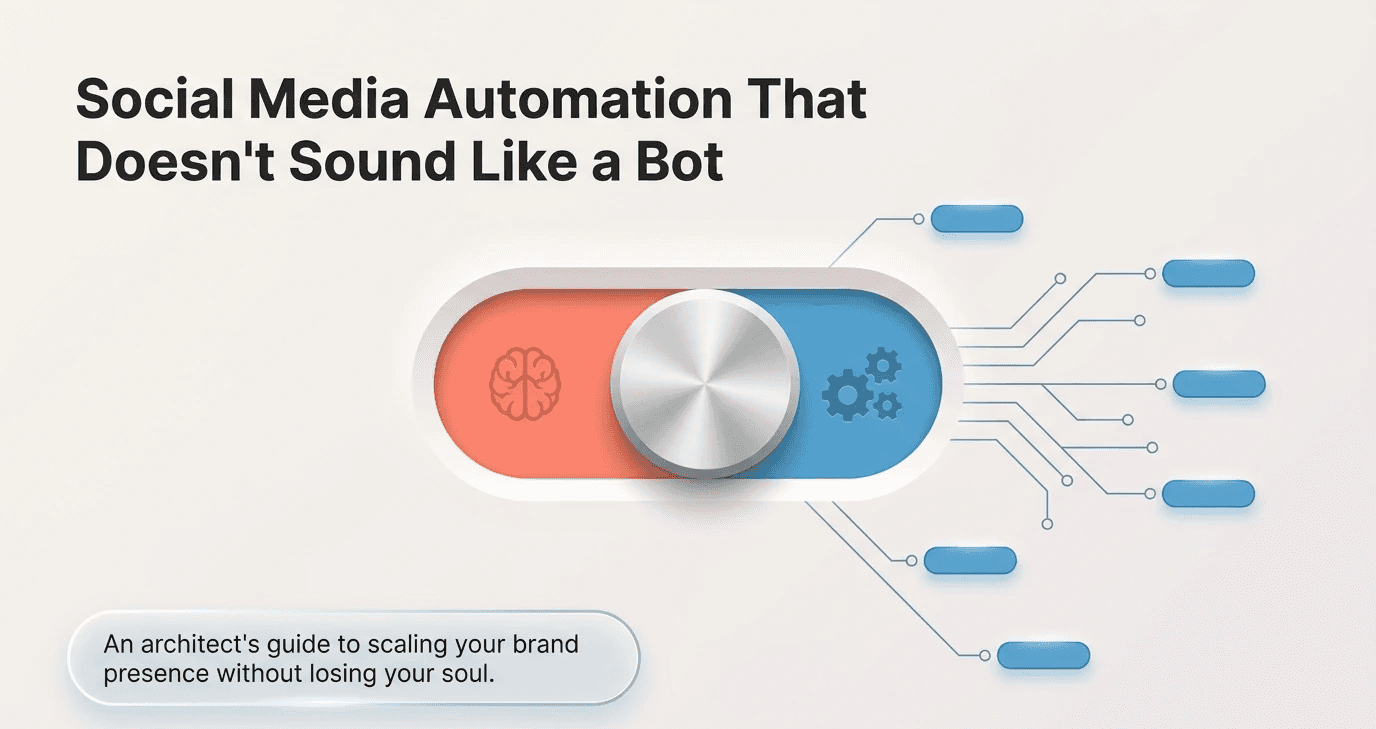
Social media automation is using tools and software to handle repetitive social media tasks for you, instead of doing them manually every day.
Things like scheduling posts in advance, republishing old content, pulling analytics reports, or sending an auto-reply to common DMs. You set it up once, and the tool handles it on a schedule. The idea is simple: free up your time for the stuff that actually needs a human, writing, responding to real comments, jumping on trends, building relationships with your audience.
It doesn't mean your social media runs itself. It means the mechanical, time-consuming parts run in the background while you focus on the work that actually moves people.
Why Social Media Automation Goes Wrong
Most brands that try automation end up with one of two problems. Either they automate too much and their feed starts looking robotic, same energy every post, no real response to what's happening in the world. Or they automate too little, get overwhelmed, and go completely quiet for weeks at a time.
Both kill engagement. And both are avoidable.
The mistake isn't using automation. It's using it without a strategy. Automation is a tool, not a replacement for thinking. The brands that get it right use it to handle the mechanical work, scheduling, republishing, reporting, and stay present for everything that needs a human brain.
The Real Problem Automation doesn't make brands feel inhuman. Bad automation does. The goal is to use it as infrastructure, not as a substitute for genuine engagement. |
What You Should Automate on Social Media
Let's start with the easy wins, the tasks that are repetitive, time-consuming, and don't actually need a human touch to do well.
Post Scheduling
This is the obvious one. Writing content in batches and scheduling it out for the week (or the month) saves a massive amount of time. You're still writing the content, you're just not manually hitting publish every single day. Tools like Buffer, Later, and Hootsuite handle this without breaking a sweat.
Content Republishing
Your best-performing posts have a shelf life that goes way beyond the day you published them. Automating republishing, especially on platforms like Twitter/X or LinkedIn, means your evergreen content keeps working for you without you having to think about it.
RSS and Curation Feeds
If you share industry news or curated content from other sources, you can automate that too. Pull in RSS feeds, filter by topic, and let a tool like Zapier push relevant articles into your queue. You still review before anything goes live, but the sourcing is done for you.
Analytics and Reporting
Weekly reports on reach, engagement, follower growth, and click-throughs, all of this can be automated. Set up a dashboard in a tool like Metricool or Sprout Social and get the data delivered to your inbox on a schedule. You don't need to manually pull this every week.
DM Auto-Replies for FAQs
If you receive the same five questions every week, including price, hours, and a link to the website, automate the first response. Make it warm, make it on-brand, and always give people a way to talk to a real person if they need more.
Hashtag and Caption Templates
Not the most glamorous automation, but incredibly useful. Build a library of hashtag sets, caption starters, and brand phrases. Your team pulls from these when writing, which keeps things consistent and cuts down production time.
Also Read: Why Influencer Marketing Fails
What is Social Media Automation
Social media automation is using tools and software to handle repetitive social media tasks for you, instead of doing them manually every day.
Things like scheduling posts in advance, republishing old content, pulling analytics reports, or sending an auto-reply to common DMs. You set it up once, and the tool handles it on a schedule. The idea is simple: free up your time for the stuff that actually needs a human, writing, responding to real comments, jumping on trends, building relationships with your audience.
It doesn't mean your social media runs itself. It means the mechanical, time-consuming parts run in the background while you focus on the work that actually moves people.
Why Social Media Automation Goes Wrong
Most brands that try automation end up with one of two problems. Either they automate too much and their feed starts looking robotic, same energy every post, no real response to what's happening in the world. Or they automate too little, get overwhelmed, and go completely quiet for weeks at a time.
Both kill engagement. And both are avoidable.
The mistake isn't using automation. It's using it without a strategy. Automation is a tool, not a replacement for thinking. The brands that get it right use it to handle the mechanical work, scheduling, republishing, reporting, and stay present for everything that needs a human brain.
The Real Problem Automation doesn't make brands feel inhuman. Bad automation does. The goal is to use it as infrastructure, not as a substitute for genuine engagement. |
What You Should Automate on Social Media
Let's start with the easy wins, the tasks that are repetitive, time-consuming, and don't actually need a human touch to do well.
Post Scheduling
This is the obvious one. Writing content in batches and scheduling it out for the week (or the month) saves a massive amount of time. You're still writing the content, you're just not manually hitting publish every single day. Tools like Buffer, Later, and Hootsuite handle this without breaking a sweat.
Content Republishing
Your best-performing posts have a shelf life that goes way beyond the day you published them. Automating republishing, especially on platforms like Twitter/X or LinkedIn, means your evergreen content keeps working for you without you having to think about it.
RSS and Curation Feeds
If you share industry news or curated content from other sources, you can automate that too. Pull in RSS feeds, filter by topic, and let a tool like Zapier push relevant articles into your queue. You still review before anything goes live, but the sourcing is done for you.
Analytics and Reporting
Weekly reports on reach, engagement, follower growth, and click-throughs, all of this can be automated. Set up a dashboard in a tool like Metricool or Sprout Social and get the data delivered to your inbox on a schedule. You don't need to manually pull this every week.
DM Auto-Replies for FAQs
If you receive the same five questions every week, including price, hours, and a link to the website, automate the first response. Make it warm, make it on-brand, and always give people a way to talk to a real person if they need more.
Hashtag and Caption Templates
Not the most glamorous automation, but incredibly useful. Build a library of hashtag sets, caption starters, and brand phrases. Your team pulls from these when writing, which keeps things consistent and cuts down production time.
Also Read: Why Influencer Marketing Fails
Automate vs. Keep Human: A Simple Breakdown
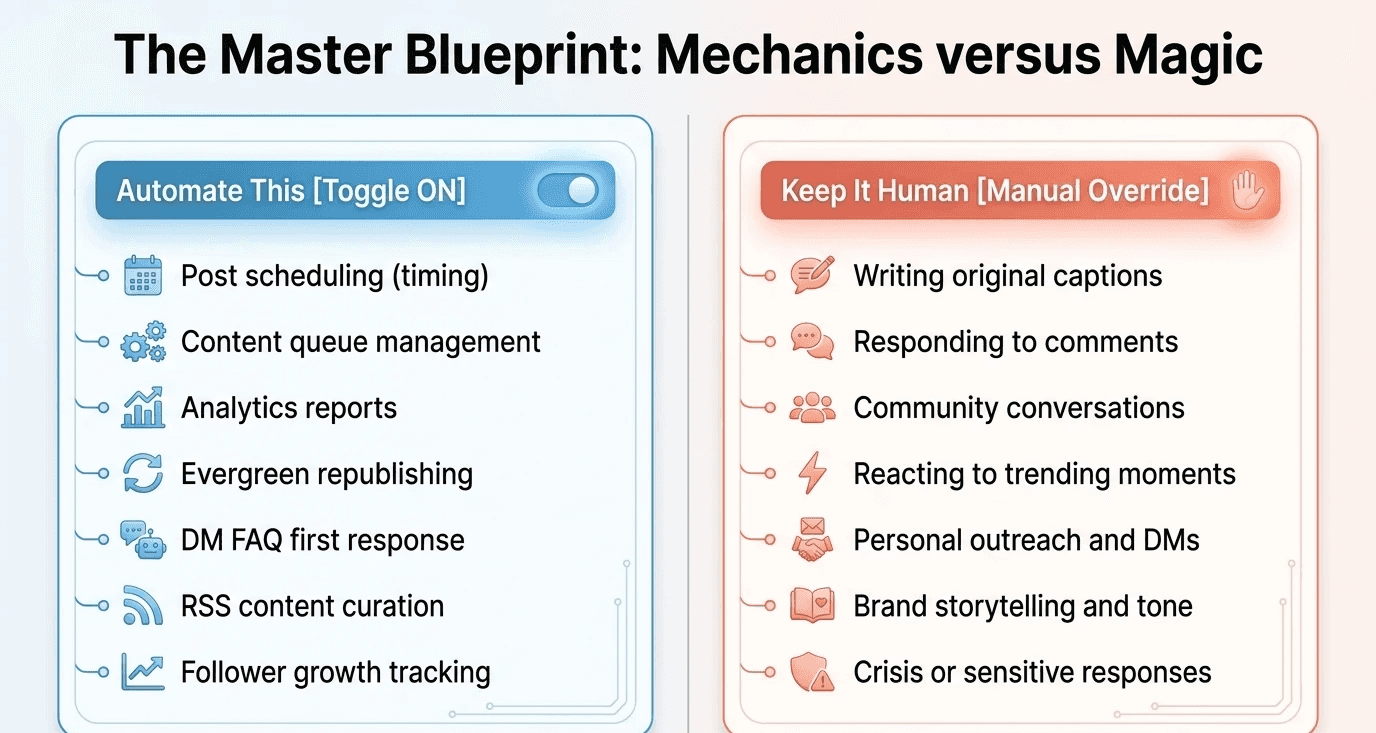
Here's a quick reference. Bookmark this. Print it out. Stick it near your desk.
Automate This | Keep It Human |
Post scheduling (timing) | Writing original captions |
Content queue management | Responding to comments |
Analytics reports | Community conversations |
Evergreen republishing | Reacting to trending moments |
DM FAQ first response | Personal outreach and DMs |
RSS content curation | Brand storytelling and tone |
Follower growth tracking | Crisis or sensitive responses |
What You Should Never Automate on Social Media
This part matters just as much as what you do automate. There are things that, the moment you hand them to a tool, they lose all their value.
Responding to Comments and DMs
A real comment deserves a real reply. Auto-replies to comments, especially the generic "Thanks for sharing!" type, are spotted immediately and they signal that no one's home. This is where the community gets built or broken. It takes more time, but it's worth it.
Trending Conversations
When something is happening in real time, a cultural moment, industry news, a viral conversation in your niche, that's your window. You can't pre-schedule relevance. Someone on your team needs to be watching and ready to jump in when it makes sense for your brand.
Brand Voice and Storytelling
You can use AI to assist with writing, but your brand's actual voice, tone, and the way you tell your story should always have a human hand in it. Readers can feel the difference between content that came from someone who actually cares and content that was generated and published without anyone really reading it.
Sensitive Situations
If something goes wrong, a complaint goes viral, a sensitive topic comes up, there's a PR situation, a human needs to handle it. Immediately. Automation has no emotional intelligence. It can't read a room.
Also Read: What’s Social Media SEO
How to Build a Social Media Automation System: 5 Easy Steps
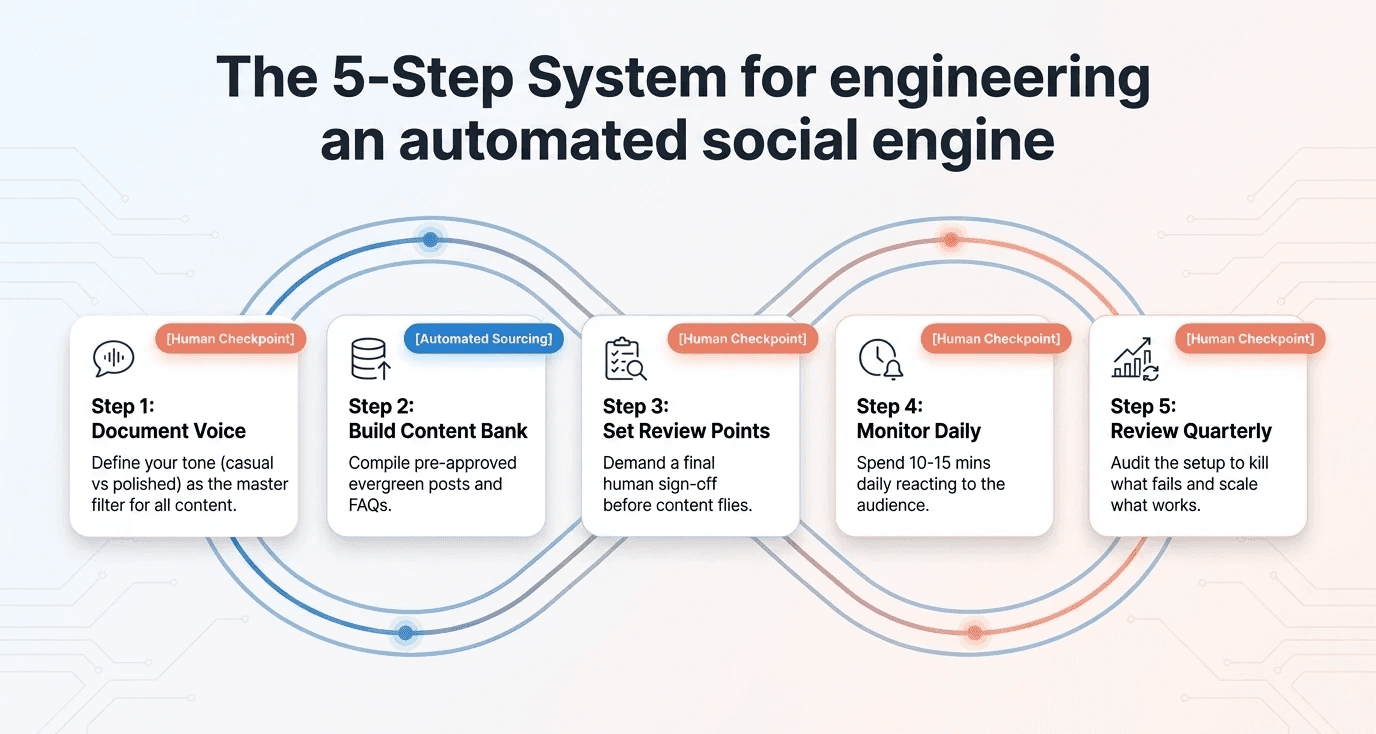
Setting up automation isn't just picking a tool and connecting your accounts. You need a system that holds your brand voice together even when a machine is doing part of the work.
Step 1: Document Your Brand Voice
Before you automate anything, write down what your brand sounds like. What words do you use? What do you avoid? Are you casual or polished? Direct or warm? This document becomes the filter for everything, human-written and automated alike.
Step 2: Build a Content Bank
Create a library of pre-approved content: evergreen posts, FAQs, recurring formats, seasonal messages. Your automation tools pull from this. Everything in the bank has already been reviewed and approved, so when it goes out, it's on-brand.
Step 3: Set Human Review Points
Don't just let content fly. Build in checkpoints. Maybe everything scheduled more than 24 hours out gets a final review. Maybe someone signs off on the week's queue every Monday morning. However you structure it, there should be human eyes on the content before it goes live.
Step 4: Monitor Daily, Even if Briefly
Automation doesn't mean you're off the hook. Someone needs to check in every day, even just 10 or 15 minutes, to respond to comments, catch anything that might need adjusting, and stay plugged into what's happening with your audience.
Step 5: Review Your Automation Quarterly
What worked six months ago might not work now. Platforms change, audiences shift, your brand evolves. Build a habit of auditing your automation setup every few months. Kill what's not working. Double down on what is.
Want Someone to Handle Social Media for You? Motion Labs is an AI video and content agency built for brands that want to move fast without losing quality. They handle social media management, short-form video production, UGC campaigns, and graphic design, so you get a consistent, professional presence without having to build an in-house team to run it. Visit motionlabs.agency to learn more. |
Also read: Micro-influencer vs Macro influencer which is best for you
Best Social Media Automation Tools Worth Using
There's no shortage of tools out there. Here are the ones that actually deliver without overcomplicating things.
• Buffer: Clean, simple scheduling. Great for small teams. Handles most major platforms.
• Hootsuite: More robust. Good for teams managing multiple brands or accounts.
• Later: Excellent for visual planning. Strong on Instagram and TikTok.
• Metricool; Great all-in-one for scheduling plus analytics. Very solid reporting.
• Zapier: The connector. Automates the stuff between your tools. RSS feeds, notifications, cross-posting workflows.
• ManyChat: Best for Instagram and Facebook DM automation. Good for FAQ flows.
Automate vs. Keep Human: A Simple Breakdown
Here's a quick reference. Bookmark this. Print it out. Stick it near your desk.
Automate This | Keep It Human |
Post scheduling (timing) | Writing original captions |
Content queue management | Responding to comments |
Analytics reports | Community conversations |
Evergreen republishing | Reacting to trending moments |
DM FAQ first response | Personal outreach and DMs |
RSS content curation | Brand storytelling and tone |
Follower growth tracking | Crisis or sensitive responses |
What You Should Never Automate on Social Media
This part matters just as much as what you do automate. There are things that, the moment you hand them to a tool, they lose all their value.
Responding to Comments and DMs
A real comment deserves a real reply. Auto-replies to comments, especially the generic "Thanks for sharing!" type, are spotted immediately and they signal that no one's home. This is where the community gets built or broken. It takes more time, but it's worth it.
Trending Conversations
When something is happening in real time, a cultural moment, industry news, a viral conversation in your niche, that's your window. You can't pre-schedule relevance. Someone on your team needs to be watching and ready to jump in when it makes sense for your brand.
Brand Voice and Storytelling
You can use AI to assist with writing, but your brand's actual voice, tone, and the way you tell your story should always have a human hand in it. Readers can feel the difference between content that came from someone who actually cares and content that was generated and published without anyone really reading it.
Sensitive Situations
If something goes wrong, a complaint goes viral, a sensitive topic comes up, there's a PR situation, a human needs to handle it. Immediately. Automation has no emotional intelligence. It can't read a room.
Also Read: What’s Social Media SEO
How to Build a Social Media Automation System: 5 Easy Steps
Setting up automation isn't just picking a tool and connecting your accounts. You need a system that holds your brand voice together even when a machine is doing part of the work.
Step 1: Document Your Brand Voice
Before you automate anything, write down what your brand sounds like. What words do you use? What do you avoid? Are you casual or polished? Direct or warm? This document becomes the filter for everything, human-written and automated alike.
Step 2: Build a Content Bank
Create a library of pre-approved content: evergreen posts, FAQs, recurring formats, seasonal messages. Your automation tools pull from this. Everything in the bank has already been reviewed and approved, so when it goes out, it's on-brand.
Step 3: Set Human Review Points
Don't just let content fly. Build in checkpoints. Maybe everything scheduled more than 24 hours out gets a final review. Maybe someone signs off on the week's queue every Monday morning. However you structure it, there should be human eyes on the content before it goes live.
Step 4: Monitor Daily, Even if Briefly
Automation doesn't mean you're off the hook. Someone needs to check in every day, even just 10 or 15 minutes, to respond to comments, catch anything that might need adjusting, and stay plugged into what's happening with your audience.
Step 5: Review Your Automation Quarterly
What worked six months ago might not work now. Platforms change, audiences shift, your brand evolves. Build a habit of auditing your automation setup every few months. Kill what's not working. Double down on what is.
Want Someone to Handle Social Media for You? Motion Labs is an AI video and content agency built for brands that want to move fast without losing quality. They handle social media management, short-form video production, UGC campaigns, and graphic design, so you get a consistent, professional presence without having to build an in-house team to run it. Visit motionlabs.agency to learn more. |
Also read: Micro-influencer vs Macro influencer which is best for you
Best Social Media Automation Tools Worth Using
There's no shortage of tools out there. Here are the ones that actually deliver without overcomplicating things.
• Buffer: Clean, simple scheduling. Great for small teams. Handles most major platforms.
• Hootsuite: More robust. Good for teams managing multiple brands or accounts.
• Later: Excellent for visual planning. Strong on Instagram and TikTok.
• Metricool; Great all-in-one for scheduling plus analytics. Very solid reporting.
• Zapier: The connector. Automates the stuff between your tools. RSS feeds, notifications, cross-posting workflows.
• ManyChat: Best for Instagram and Facebook DM automation. Good for FAQ flows.
Conclusion
Automation isn't the enemy of authenticity. Bad strategy is. When you use automation to handle the logistics, the scheduling, the reporting, the curation, you free up your team to do what actually moves the needle: writing great content, showing up in the comments, and building real relationships with your audience.
The brands winning on social media right now aren't the ones posting the most. They're the ones that show up consistently, sound like real people, and respond when it matters. Automation just makes the consistent part easier to sustain.
Motion Labs If you'd rather have a team run all of this for you, strategy, video, social, and content, Motion Labs works with startups and growing brands to build and manage the whole thing. Visit motionlabs.agency. |
Frequently Asked Questions About Social Media Automation
Does social media automation hurt engagement?
It can, if you overdo it. Automating scheduling and reporting doesn't hurt anything. Automating your replies or using generic pre-written responses everywhere will hurt your engagement fast. Keep the mechanical stuff automated and the relational stuff human.
What's the best free social media automation tool?
Buffer's free plan is solid for getting started, you get three channels and basic scheduling. Later also has a free tier that works well for Instagram-first brands. Once you scale, you'll want to invest in a paid plan.
Can I automate Instagram posting?
Yes. Instagram's API now allows direct publishing through approved tools. Buffer, Later, Hootsuite, and Metricool all support it. You can schedule feed posts, Reels, and Stories depending on the tool.
How do I maintain brand voice when using automation?
Write everything in advance using your brand voice document as a guide, have a human review content before it goes live, and never automate your responses to real comments or messages. The writing can be pre-scheduled, the conversation should always be live.
Is it okay to use AI to write social media posts?
Yes, as a starting point. AI can help you draft, brainstorm, and speed up production. But someone on your team should always review, edit, and make sure it actually sounds like you before it goes anywhere
Conclusion
Automation isn't the enemy of authenticity. Bad strategy is. When you use automation to handle the logistics, the scheduling, the reporting, the curation, you free up your team to do what actually moves the needle: writing great content, showing up in the comments, and building real relationships with your audience.
The brands winning on social media right now aren't the ones posting the most. They're the ones that show up consistently, sound like real people, and respond when it matters. Automation just makes the consistent part easier to sustain.
Motion Labs If you'd rather have a team run all of this for you, strategy, video, social, and content, Motion Labs works with startups and growing brands to build and manage the whole thing. Visit motionlabs.agency. |
Frequently Asked Questions About Social Media Automation
Does social media automation hurt engagement?
It can, if you overdo it. Automating scheduling and reporting doesn't hurt anything. Automating your replies or using generic pre-written responses everywhere will hurt your engagement fast. Keep the mechanical stuff automated and the relational stuff human.
What's the best free social media automation tool?
Buffer's free plan is solid for getting started, you get three channels and basic scheduling. Later also has a free tier that works well for Instagram-first brands. Once you scale, you'll want to invest in a paid plan.
Can I automate Instagram posting?
Yes. Instagram's API now allows direct publishing through approved tools. Buffer, Later, Hootsuite, and Metricool all support it. You can schedule feed posts, Reels, and Stories depending on the tool.
How do I maintain brand voice when using automation?
Write everything in advance using your brand voice document as a guide, have a human review content before it goes live, and never automate your responses to real comments or messages. The writing can be pre-scheduled, the conversation should always be live.
Is it okay to use AI to write social media posts?
Yes, as a starting point. AI can help you draft, brainstorm, and speed up production. But someone on your team should always review, edit, and make sure it actually sounds like you before it goes anywhere
the call your competitor wish you would'nt take


Related Posts





Related Posts
Related Posts
Motion labs
info@motionlabs.agency


+971 55317 1706
C-1802, ONTARIO TOWER, PLOT NO. 49-0, BUSINESS BAY, DUBAI, 00000
click to meet me :)
click to meet me :)
© All Rights Reserved | 2026


Motion labs
info@motionlabs.agency
+971 55317 1706
C-1802, ONTARIO TOWER, PLOT NO. 49-0, BUSINESS BAY, DUBAI, 00000
Private policy
Terms & Conditions
© All Rights Reserved | 2026
click to meet me :)