5 min
read
8 Tips for Video Production Success
8 Tips for Video Production Success
Content
Marketing

Author

Scroll down
to read more!
Summerize with ChatGPT
Summerize with Gemini
Summerize with Claude
8 Tips for Video Production Success
8 Tips for Video Production Success
Even your best script is a waste if you are not using these 8 tips in your video production.
Even your best script is a waste if you are not using these 8 tips in your video production.
Before we learn how you can improve your video production, let’s take a look at what video production exactly is.
What is Video Production?
Video production is the process of creating a video from start to finish. There are three main stages:
1. Pre-Production (Planning) Before any camera rolls, you plan everything. This includes writing the script, deciding the locations, casting people, and making a shot list. It's the blueprint stage.
2. Production (Filming) This is the actual shooting. Cameras, lights, microphones, everything comes together here. This stage is often the shortest but needs the most coordination.
3. Post-Production (Editing) After filming, you take all the raw footage and shape it into the final video. This includes cutting clips, adding music, color grading, subtitles, sound mixing, and effects.
The process is simple:
Plan it → Film it → Edit it → Publish it
Also Read: 6 best ways to boost your brand storytelling
8 Tips for Video Production Success
Now you know what video production is. So let’s talk about how you can improve your video production.
#1 Originality
Originality is rare nowadays, and by doing what’s rare, you can stand out in public. The concept for your video should be original and creative. Copy-paste is easy, but not effective.
Instead, do research; see what people are liking; do keyword research; look around to see which types of video content are popular and successful in your industry, among your audience. You can’t win hearts by following the trend; you can win them by starting the trend.
#2 Planning
Planning plays a key role in a successful video production. Many video productions fail because they just write a script and go to shoot the very next moment. What about a storyboard? You know what you are going to shoot, okay, but do you know how exactly you are going to shoot? Camera angles? Shoot types? Camera set up? B-rolls?
And it’s not a complicated thing to do. Just write about camera angles, types of shots, and the B-roll you may need while editing.
#3 Choose Video subjects wisely
If your video needs subjects for your video, then choose them wisely. No matter how good your script is, if you do not choose the most accurate casting actors, it’s a waste.
Pick someone who can feel the character, memorize lines, and who is confident on-camera. Conduct an interview to see who can perfectly vibe with the needs and lifestyle of your character from every aspect.
If you are thinking of casting your team or colleagues, make sure they understand and align with your goal. Someone who is just reading the script without understanding the tone, vibe, and target audience, it's all just useless.
Also Read: Why your video production sucks and how to fix it?
# 4 Sound Quality
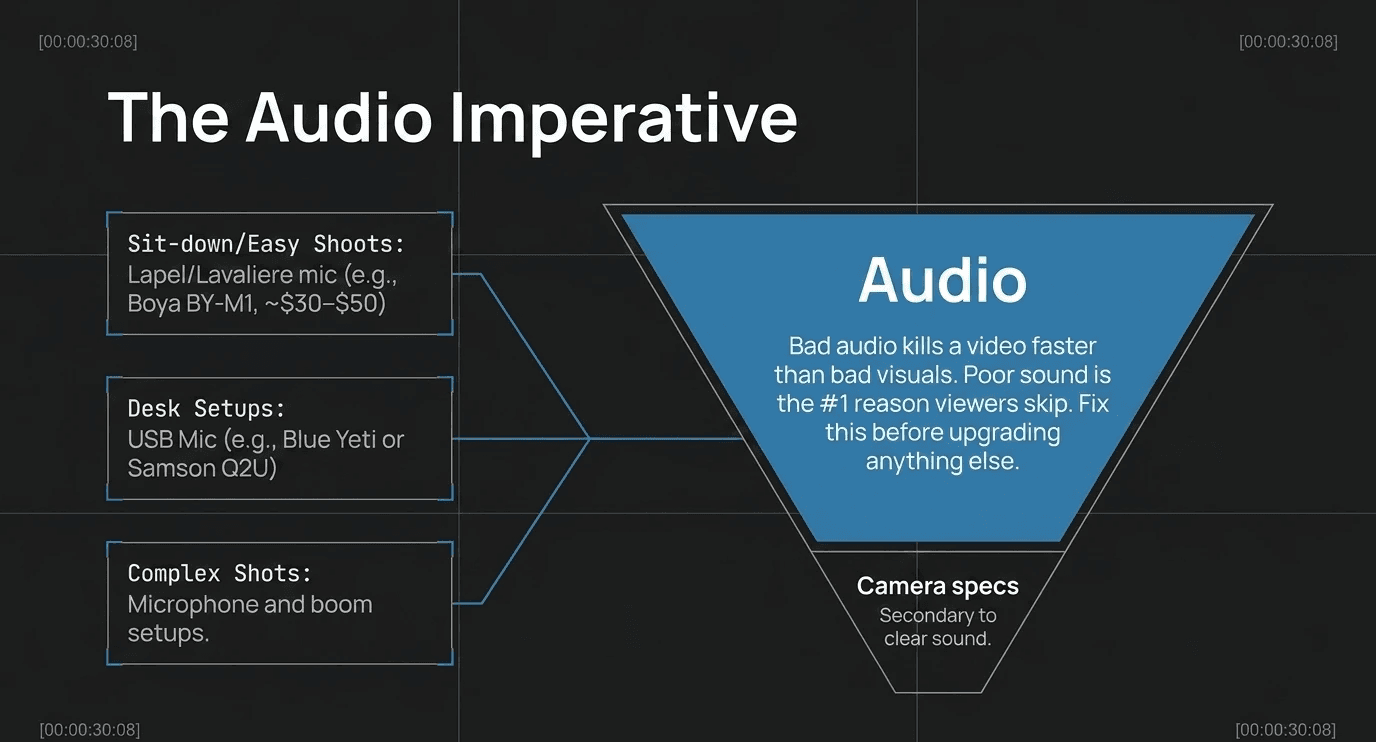
You have a good story, but without good sound quality, who is going to listen to it? Poor sound quality is one of the biggest reasons people skip your videos. Use lapel or lavaliere microphones for easy shoots and sit-down interviews, and for big and complicated shots, you can use a microphone and boom setup.
Before we learn how you can improve your video production, let’s take a look at what video production exactly is.
What is Video Production?
Video production is the process of creating a video from start to finish. There are three main stages:
1. Pre-Production (Planning) Before any camera rolls, you plan everything. This includes writing the script, deciding the locations, casting people, and making a shot list. It's the blueprint stage.
2. Production (Filming) This is the actual shooting. Cameras, lights, microphones, everything comes together here. This stage is often the shortest but needs the most coordination.
3. Post-Production (Editing) After filming, you take all the raw footage and shape it into the final video. This includes cutting clips, adding music, color grading, subtitles, sound mixing, and effects.
The process is simple:
Plan it → Film it → Edit it → Publish it
Also Read: 6 best ways to boost your brand storytelling
8 Tips for Video Production Success
Now you know what video production is. So let’s talk about how you can improve your video production.
#1 Originality
Originality is rare nowadays, and by doing what’s rare, you can stand out in public. The concept for your video should be original and creative. Copy-paste is easy, but not effective.
Instead, do research; see what people are liking; do keyword research; look around to see which types of video content are popular and successful in your industry, among your audience. You can’t win hearts by following the trend; you can win them by starting the trend.
#2 Planning
Planning plays a key role in a successful video production. Many video productions fail because they just write a script and go to shoot the very next moment. What about a storyboard? You know what you are going to shoot, okay, but do you know how exactly you are going to shoot? Camera angles? Shoot types? Camera set up? B-rolls?
And it’s not a complicated thing to do. Just write about camera angles, types of shots, and the B-roll you may need while editing.
#3 Choose Video subjects wisely
If your video needs subjects for your video, then choose them wisely. No matter how good your script is, if you do not choose the most accurate casting actors, it’s a waste.
Pick someone who can feel the character, memorize lines, and who is confident on-camera. Conduct an interview to see who can perfectly vibe with the needs and lifestyle of your character from every aspect.
If you are thinking of casting your team or colleagues, make sure they understand and align with your goal. Someone who is just reading the script without understanding the tone, vibe, and target audience, it's all just useless.
Also Read: Why your video production sucks and how to fix it?
# 4 Sound Quality
You have a good story, but without good sound quality, who is going to listen to it? Poor sound quality is one of the biggest reasons people skip your videos. Use lapel or lavaliere microphones for easy shoots and sit-down interviews, and for big and complicated shots, you can use a microphone and boom setup.
#5 Lighting Set-Up
Your video shouldn’t be under- or over-exposed. The best step to achieve the perfect light for your setup is to go for a three-point light setup. Or you can just use a ring light for light shoots; just be mindful of the reflection in glasses.
#6 Use a Tripod
Don’t make a big mistake by thinking, "Oh, it’s just a 60-second video, I don’t need a tripod.” No, you don't need a tripod. Use a standing tripod or a table tripod, or you can just put it in a place where it can capture the frame perfectly. The goal is to make your video stable and professional.
#7 Captions
Keep the style of your text and titles simple, classy, and sharp. Choose it according to your brand theme, color, and video type.
Don’t make it complicated. Choose a clear and bold font, and use text animations to keep the viewer engaged.
#8 Clips Dropping
This is the small thing that creates a problem in the long run. And it’s very easy to sort out. Just make a proper folder to dump your videos. So you don’t have to waste your time finding the videos here and there while editing.
Also read: 4 best examples of UGC
What Equipment Do You Need to Start Video Production
There is a lot of equipment in the market, but not everyone is for you.
1. Camera
A modern smartphone (iPhone or Android) shoots better video than professional cameras from 10 years ago
You only need a dedicated camera when your phone genuinely becomes the bottleneck, and that takes a while
If you do want a camera, a used Sony ZV-E10 or Canon M50 is enough for most creators
2. Microphone
Bad audio kills a video faster than bad visuals
A $30–$50 lapel mic (like the Boya BY-M1) is a massive upgrade over your phone's built-in mic
For desk setups, a USB mic like the Blue Yeti or Samson Q2U works well
Rule of thumb: fix audio before you upgrade anything else
3. Lighting
A single softbox or ring light eliminates most amateur-looking footage
If the budget is tight, sit facing a window; natural light is free and effective
Avoid overhead lighting; it creates harsh shadows on your face
4. Tripod or Stabiliser
A basic $15–$20 tripod is enough for static shots
If you film while moving, a gimbal helps, but it's not urgent early on
5. Editing Software
Beginners: CapCut (mobile), DaVinci Resolve (desktop), both free
Mid-level: Adobe Premiere Pro or Final Cut Pro (paid, worth it later)
Don't pay for editing software until you're editing consistently
6. Storage & Backup
Video files are large; get an external hard drive early
Back up everything in at least two places (local + cloud)
Losing footage is a painful lesson most creators learn once
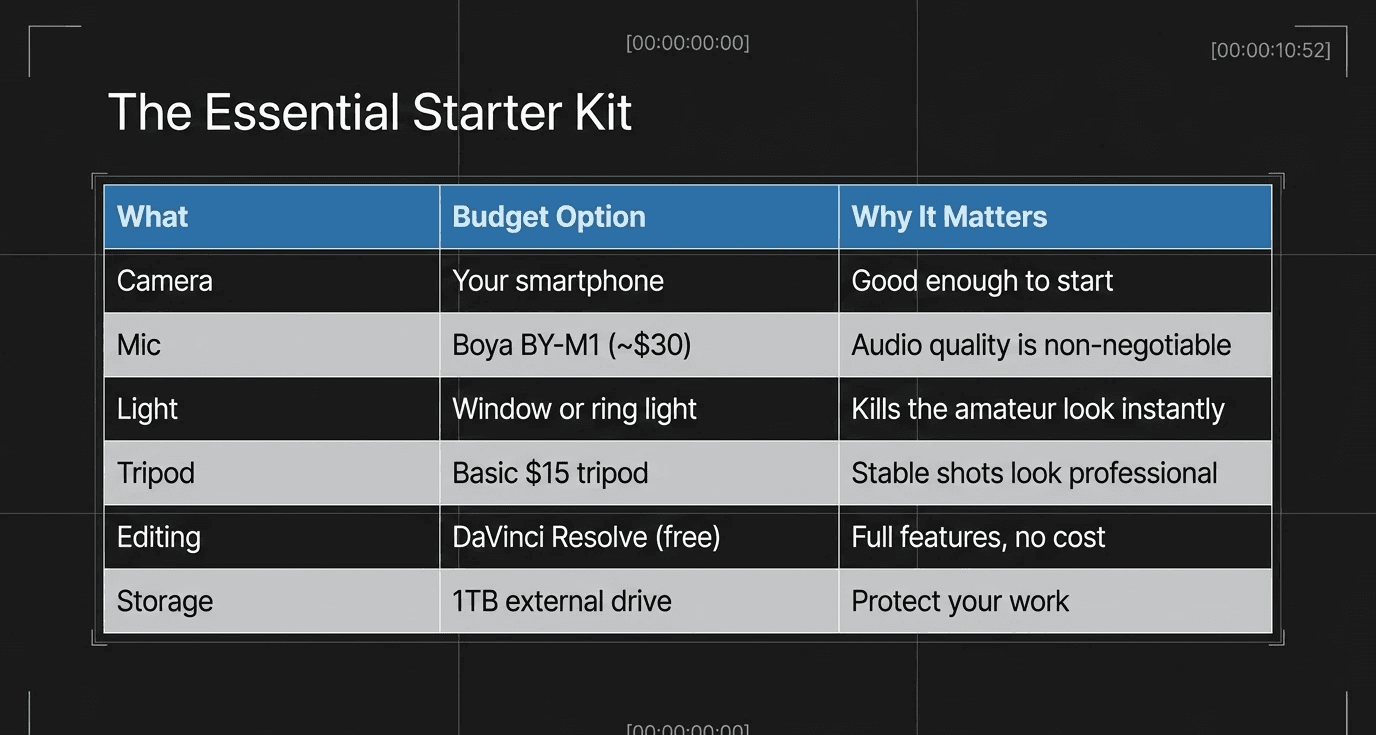
The Starter Kit Summary:
What | Budget Option | Why It Matters |
Camera | Your smartphone | Good enough to start |
Mic | Boya BY-M1 (~$30) | Audio quality is non-negotiable |
Light | Window or ring light | Kills the "amateur" look instantly |
Tripod | Basic $15 tripod | Stable shots look professional |
Editing | DaVinci Resolve (free) | Full features, no cost |
Storage | 1TB external drive | Protect your work |
#5 Lighting Set-Up
Your video shouldn’t be under- or over-exposed. The best step to achieve the perfect light for your setup is to go for a three-point light setup. Or you can just use a ring light for light shoots; just be mindful of the reflection in glasses.
#6 Use a Tripod
Don’t make a big mistake by thinking, "Oh, it’s just a 60-second video, I don’t need a tripod.” No, you don't need a tripod. Use a standing tripod or a table tripod, or you can just put it in a place where it can capture the frame perfectly. The goal is to make your video stable and professional.
#7 Captions
Keep the style of your text and titles simple, classy, and sharp. Choose it according to your brand theme, color, and video type.
Don’t make it complicated. Choose a clear and bold font, and use text animations to keep the viewer engaged.
#8 Clips Dropping
This is the small thing that creates a problem in the long run. And it’s very easy to sort out. Just make a proper folder to dump your videos. So you don’t have to waste your time finding the videos here and there while editing.
Also read: 4 best examples of UGC
What Equipment Do You Need to Start Video Production
There is a lot of equipment in the market, but not everyone is for you.
1. Camera
A modern smartphone (iPhone or Android) shoots better video than professional cameras from 10 years ago
You only need a dedicated camera when your phone genuinely becomes the bottleneck, and that takes a while
If you do want a camera, a used Sony ZV-E10 or Canon M50 is enough for most creators
2. Microphone
Bad audio kills a video faster than bad visuals
A $30–$50 lapel mic (like the Boya BY-M1) is a massive upgrade over your phone's built-in mic
For desk setups, a USB mic like the Blue Yeti or Samson Q2U works well
Rule of thumb: fix audio before you upgrade anything else
3. Lighting
A single softbox or ring light eliminates most amateur-looking footage
If the budget is tight, sit facing a window; natural light is free and effective
Avoid overhead lighting; it creates harsh shadows on your face
4. Tripod or Stabiliser
A basic $15–$20 tripod is enough for static shots
If you film while moving, a gimbal helps, but it's not urgent early on
5. Editing Software
Beginners: CapCut (mobile), DaVinci Resolve (desktop), both free
Mid-level: Adobe Premiere Pro or Final Cut Pro (paid, worth it later)
Don't pay for editing software until you're editing consistently
6. Storage & Backup
Video files are large; get an external hard drive early
Back up everything in at least two places (local + cloud)
Losing footage is a painful lesson most creators learn once
The Starter Kit Summary:
What | Budget Option | Why It Matters |
Camera | Your smartphone | Good enough to start |
Mic | Boya BY-M1 (~$30) | Audio quality is non-negotiable |
Light | Window or ring light | Kills the "amateur" look instantly |
Tripod | Basic $15 tripod | Stable shots look professional |
Editing | DaVinci Resolve (free) | Full features, no cost |
Storage | 1TB external drive | Protect your work |
Conclusion
Video production is not tough or complicated. But you are just skipping the small details that create big impact later. We have discussed about 8 major tips to improve your video production. The most important equipment you’ll need to create the best videos.
It’s not tough to achieve, but yeah, responsible work, I would say. Don’t worry, we are here to take the responsibility of your successful video production. Motion Labs, visit now.
FAQ
Q1. What equipment do I need to start making videos?
A phone, a cheap lapel mic, and good lighting. That's genuinely all you need to start. Add gear only when something specific is holding you back.
Q2. Why does my video look unprofessional even with a good camera?
Usually it's the lighting or audio, not the camera. Fix those two first, and your footage will look significantly better overnight.
Q3. How long does it take to get good at video production?
Most people see real improvement within 3 to 6 months of filming consistently. The learning curve is steep at first, then flattens out fast once the basics click.
Q4. Do I need expensive editing software?
No. DaVinci Resolve and CapCut are both free and handle everything a beginner to intermediate creator needs. Pay for software only when you've outgrown the free tools.
Q5. How do I make my videos look more cinematic?
Three things: stabilise your shots, colour grade your footage even slightly, and use background music at low volume. Those three alone make a noticeable difference without touching anything else.
Conclusion
Video production is not tough or complicated. But you are just skipping the small details that create big impact later. We have discussed about 8 major tips to improve your video production. The most important equipment you’ll need to create the best videos.
It’s not tough to achieve, but yeah, responsible work, I would say. Don’t worry, we are here to take the responsibility of your successful video production. Motion Labs, visit now.
FAQ
Q1. What equipment do I need to start making videos?
A phone, a cheap lapel mic, and good lighting. That's genuinely all you need to start. Add gear only when something specific is holding you back.
Q2. Why does my video look unprofessional even with a good camera?
Usually it's the lighting or audio, not the camera. Fix those two first, and your footage will look significantly better overnight.
Q3. How long does it take to get good at video production?
Most people see real improvement within 3 to 6 months of filming consistently. The learning curve is steep at first, then flattens out fast once the basics click.
Q4. Do I need expensive editing software?
No. DaVinci Resolve and CapCut are both free and handle everything a beginner to intermediate creator needs. Pay for software only when you've outgrown the free tools.
Q5. How do I make my videos look more cinematic?
Three things: stabilise your shots, colour grade your footage even slightly, and use background music at low volume. Those three alone make a noticeable difference without touching anything else.
the call your competitor wish you would'nt take


Related Posts





Related Posts
Related Posts
Motion labs
info@motionlabs.agency


+971 55317 1706
C-1802, ONTARIO TOWER, PLOT NO. 49-0, BUSINESS BAY, DUBAI, 00000
click to meet me :)
click to meet me :)
© All Rights Reserved | 2026


Motion labs
info@motionlabs.agency
+971 55317 1706
C-1802, ONTARIO TOWER, PLOT NO. 49-0, BUSINESS BAY, DUBAI, 00000
Private policy
Terms & Conditions
© All Rights Reserved | 2026
click to meet me :)